
Getting Started with HyperX: Complete Platform Guide
Complete guide to using HyperX for Hyperliquid trading analytics. Set up wallet tracking, copy trading, market analysis, and more.
Platform Overview
HyperX is a professional trading analytics and copy trading platform built exclusively for Hyperliquid, the largest on-chain perpetual futures exchange. Whether you are a beginner looking to learn from top traders or an experienced trader seeking deeper market intelligence, HyperX provides the tools you need to trade more effectively.
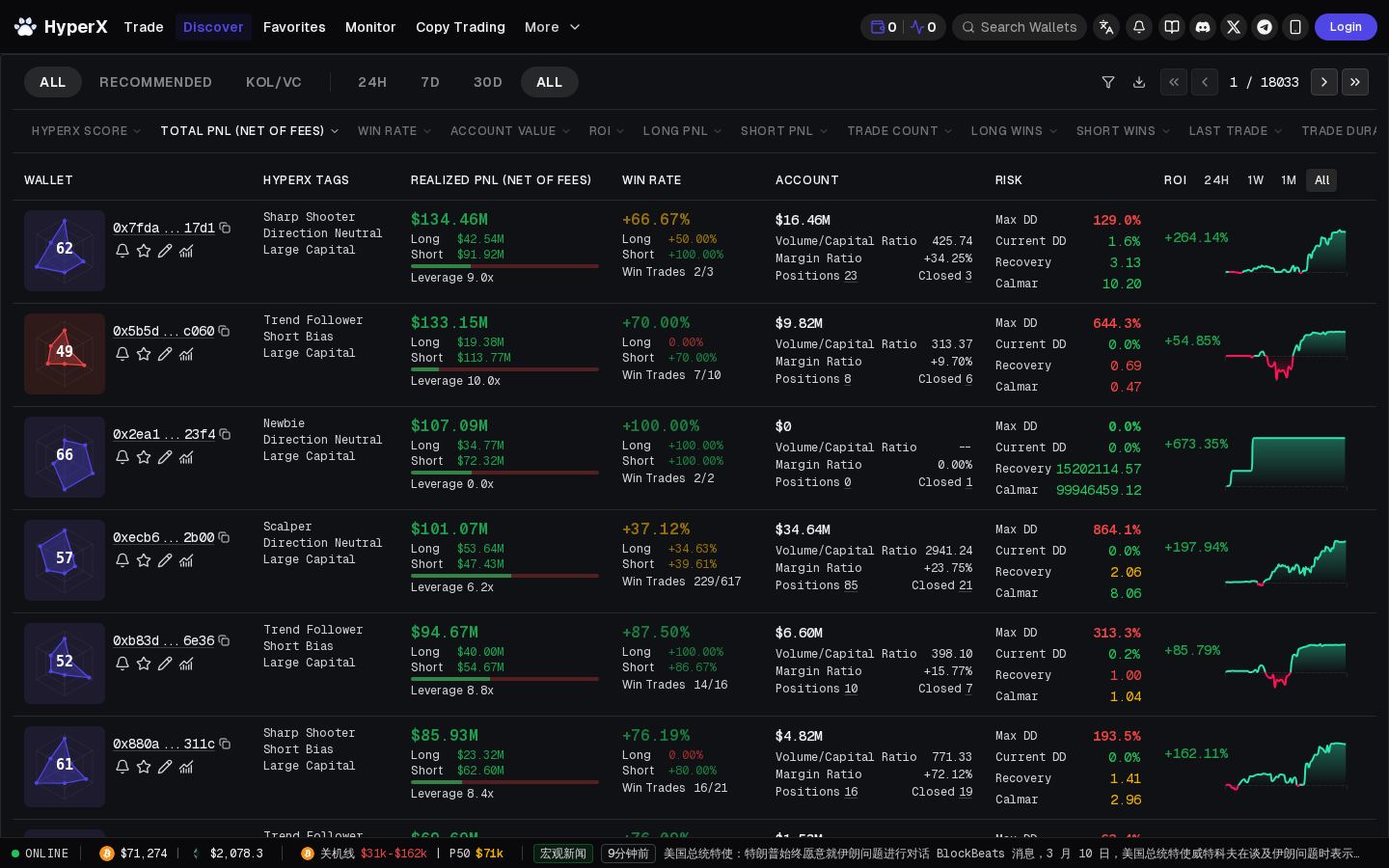
The platform is organized around a clear workflow: Discover top-performing wallets, Analyze their trading patterns, Monitor their activity, and Copy the traders you trust. Alongside this core workflow, HyperX provides comprehensive market analysis tools including liquidation data, open interest analytics, and funding rate monitoring.
HyperX is designed with a professional terminal-style interface that prioritizes data density and readability. Every metric uses monospace fonts for precision, the layout maximizes information per screen, and the design language is deliberately compact and functional — optimized for traders who need quick access to actionable data.
Getting Started
Connecting Your Wallet
To access all HyperX features, connect your wallet through the sign-in process:
- Navigate to HyperX and click the sign-in button in the top navigation
- Connect with your preferred wallet provider
- Authorize the connection — HyperX only requests read permissions by default
- For copy trading, you will need to grant trading permissions through Hyperliquid's authorization system
Your funds always remain in your Hyperliquid account. HyperX is non-custodial and never has access to withdraw your assets.
Browsing Without an Account
Many HyperX features are available without signing in. You can browse the wallet discovery leaderboard, view trader analytics, and access market analysis tools. Signing in is required for personalized features like watchlists, alerts, and copy trading.
Feature Walkthrough
Wallet Discovery
The wallet discovery page is your starting point for finding profitable traders on Hyperliquid. It presents a ranked leaderboard of wallets with key performance metrics visible at a glance.
Key capabilities:
- Sort by any metric — PnL, win rate, trade count, average return, and more. Click any column header to sort.
- Filter by timeframe — View performance over 7 days, 30 days, 90 days, or all-time to find wallets with consistent performance across different periods.
- Advanced filters — Narrow results by minimum PnL, minimum trade count, preferred assets, trading frequency, and more. This helps you find traders whose style matches your risk tolerance.
- Quick preview — Hover over any wallet to see a quick summary of their recent positions and PnL without leaving the page.
- Search — Enter any wallet address to instantly view its analytics, even if it is not on the leaderboard.
Tips for effective discovery:
- Start with the 30-day timeframe for a balance between recency and sample size
- Filter for at least 30+ trades to ensure statistical significance
- Look for positive PnL combined with a win rate above 55% — this combination usually indicates genuine skill
- Pay attention to the PnL curve shape, not just the final number. A smooth upward curve is more reliable than a single spike
Deep Trader Analysis
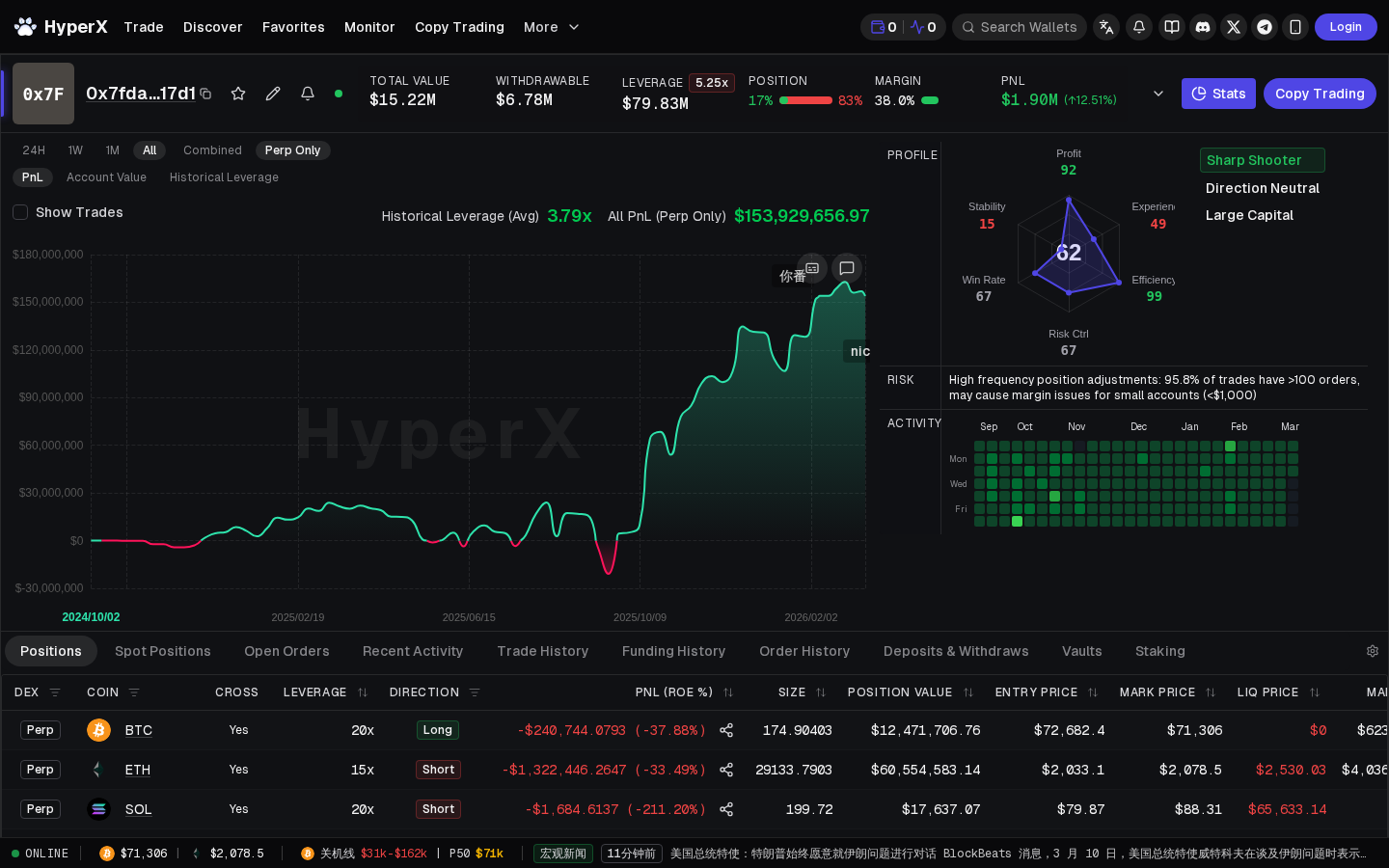
Clicking on any wallet takes you to the deep analysis page — the most detailed trader analytics available for Hyperliquid. This page breaks down every aspect of a trader's performance.
Performance Overview:
- Total PnL with breakdown by timeframe
- Win rate and average return per trade
- Maximum drawdown and current drawdown
- Sharpe ratio and risk-adjusted metrics
Trading Style Analysis:
- Average hold time — reveals whether the trader is a scalper, swing trader, or macro trader
- Trade frequency — how often the trader opens new positions
- Preferred assets — which markets the trader is most active in
- Position sizing patterns — how the trader scales into and out of positions
PnL Curve:
- Interactive chart showing cumulative PnL over time
- Adjustable timeframe from inception to custom date ranges
- Drawdown overlay showing periods of decline and recovery
- Individual trade markers showing exactly when each trade was opened and closed
Trade History:
- Complete list of every trade the wallet has executed
- Entry price, exit price, realized PnL, leverage used, and hold time for each trade
- Filter by asset, direction (long/short), and outcome (win/loss)
- Export capability for offline analysis
Wallet Monitoring
Once you have identified interesting wallets, the monitoring features keep you informed of their activity.
Watchlist:
- Add any wallet to your personal watchlist
- See at a glance what each watched wallet is currently positioned in
- View unrealized PnL and leverage for all active positions
- Organize your watchlist with custom groups (e.g., "Top Scalpers", "Macro Traders")
Activity Feed:
- Real-time stream of trades from your watched wallets
- See new positions opened, positions modified, and positions closed as they happen
- Filter by wallet, asset, or trade type
- Chronological view makes it easy to spot convergence — multiple wallets taking the same trade
Alerts:
- Configure notifications for specific wallet events
- Alert triggers include: new position opened, position size increased by X%, position closed, PnL threshold crossed
- Alerts keep you informed even when you are not actively watching the platform
Copy Trading
Copy trading is the action layer of HyperX — it allows you to automatically replicate the trades of wallets you have analyzed and trust.
Setting Up Copy Trading:
- Navigate to the trader you want to copy
- Click the copy trading button
- Configure your parameters:
- Allocation — How much capital to dedicate to copying this trader
- Position ratio — Copy at full size or a percentage (e.g., 50% means your positions are half the size of the trader's, proportionally)
- Max leverage — Cap the maximum leverage regardless of what the trader uses
- Asset filters — Only copy trades on specific assets if desired
- Risk limits — Set daily loss limits and maximum drawdown thresholds
- Confirm and activate
Managing Active Copies:
- View all active copy trading relationships in one dashboard
- See real-time PnL per copied trader
- Pause, resume, or stop any copy relationship at any time
- Adjust parameters without stopping — changes take effect on the next trade
- Performance attribution shows exactly how much each copied trader has contributed to your results
Best Practices:
- Start with a small allocation until you are confident in the trader's consistency
- Set a max leverage of 10x or less, even if the trader uses higher — this protects your capital
- Copy 3-5 traders with different styles to diversify your risk
- Review copy trading performance weekly and rotate underperformers
Market Analysis
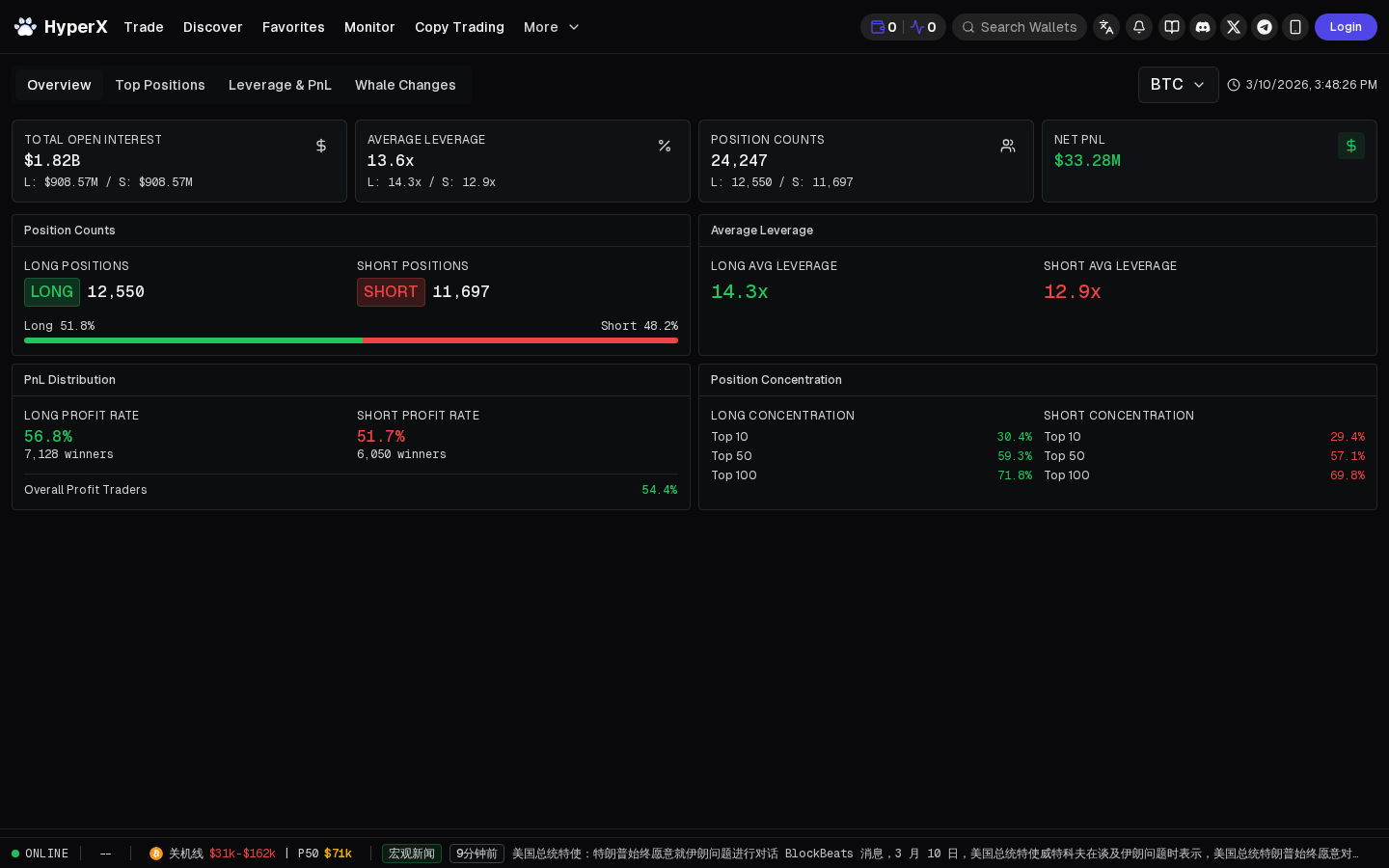
HyperX provides market-wide intelligence that complements the wallet-level analytics.
Market Overview:
- Dashboard showing all Hyperliquid markets with price, 24h change, volume, and open interest
- Sortable by any metric to quickly identify the most active or volatile markets
- At-a-glance view of market-wide funding rates to spot crowded positioning
Liquidation Data:
- Real-time feed of liquidation events across all markets
- Historical liquidation volume charts showing long vs. short liquidations over time
- Liquidation cluster analysis identifying price levels with concentrated liquidation risk
- Useful for timing entries after liquidation flushes and avoiding cascading liquidation zones
Open Interest Analysis:
- Track changes in open interest over time for any asset
- Rising open interest with rising prices suggests new money entering long — trend continuation signal
- Rising open interest with falling prices suggests new money entering short — bearish signal
- Declining open interest indicates position closure — trend exhaustion signal
Funding Rates:
- Real-time and historical funding rates for all markets
- Extremely positive funding rates indicate crowded long positioning — potential reversal risk
- Extremely negative funding rates indicate crowded short positioning — potential squeeze risk
- Funding rate trends help identify when positioning becomes extreme enough to act as a contrarian signal
Trading
HyperX integrates trading capabilities directly into the analytics platform, allowing you to act on insights without switching to a separate interface.
- Execute trades directly from the analysis pages
- Place market orders, limit orders, and stop orders
- Manage all positions from a unified portfolio view
- Real-time PnL tracking for all open positions
Pricing Tiers
Free Tier
The free tier provides access to core platform features:
- Wallet discovery and leaderboard browsing
- Basic trader analytics (PnL, win rate, trade count)
- Limited copy trading (restricted number of simultaneous copies)
- Market overview and basic liquidation data
- Watchlist with limited slots
Pro Tier
The Pro tier unlocks the full power of HyperX:
- Deep trader analysis with full PnL curves, drawdown analysis, and style classification
- Unlimited copy trading with advanced configuration options
- Full market analysis suite including historical liquidation data and open interest analytics
- Unlimited watchlist slots and advanced alert configuration
- Priority copy trading execution
- API access for custom integrations
Tips for Power Users
Keyboard Navigation
HyperX supports keyboard shortcuts for faster navigation. Use tab to move between elements, enter to drill into wallets, and escape to go back. The interface is designed for speed — experienced users can navigate the entire platform without touching the mouse.
Custom Filters
Save frequently used filter combinations in wallet discovery. If you regularly search for scalpers with 60%+ win rate and 50+ trades in the last 30 days, save this filter set for one-click access.
Multi-Tab Workflow
Open multiple trader analysis pages in separate tabs to compare wallets side-by-side. This is especially useful during the discovery phase when you are evaluating several candidates for your watchlist or copy trading setup.
Cross-Reference with Market Data
Before adding a wallet to your copy list, check the market analysis section to understand current market conditions. A trader who has been profitable during a strong uptrend may perform differently in a ranging or bearish market. Use open interest and funding rate data to contextualize a trader's recent performance.
Regular Portfolio Review
Set a weekly routine to review your copy trading performance. Ask yourself: Which traders are contributing positively? Are any consistently underperforming? Has any trader's style changed? Are there new high-performing wallets on the leaderboard worth adding? This regular review ensures your copy trading portfolio stays optimized.
Community and Resources
Documentation
HyperX maintains comprehensive documentation covering all platform features, API reference, and trading guides. The documentation is available at the HyperX docs site and is regularly updated as new features are released.
Social Channels
Stay updated with platform announcements, feature releases, and community discussions:
- Twitter/X — Follow @hyperx_trade for platform updates and market commentary
- Telegram — Join the HyperX Telegram group for community discussions and support
- Discord — The HyperX Discord server hosts active discussions, feature requests, and direct support from the team
Feature Requests
HyperX actively listens to user feedback. If you have ideas for new features or improvements, share them through the community channels. Many of the platform's most popular features originated from user suggestions.
Frequently Asked Questions
Is HyperX free to use? Yes, HyperX offers a free tier with access to core features including wallet discovery, basic analytics, and limited copy trading. The Pro tier unlocks additional features and higher limits for serious traders.
Does HyperX have custody of my funds? No. HyperX is fully non-custodial. Your funds remain in your Hyperliquid account at all times. For copy trading, you grant limited trading permissions through Hyperliquid's native authorization system, but withdrawal permissions are never requested.
Which exchanges does HyperX support? HyperX is built exclusively for Hyperliquid. This focused approach allows for deeper integration and more comprehensive analytics than multi-exchange platforms can provide.
Can I use HyperX on mobile? Yes. HyperX is a responsive web application that works on all modern mobile browsers. The interface adapts to smaller screens while maintaining access to all core features. For the best experience with data-heavy features like deep trader analysis, a desktop or tablet screen is recommended.
How do I report a bug or get support? Reach out through the HyperX Telegram group or Discord server. The team is active and responsive, and most issues are addressed within 24 hours. For critical issues related to copy trading or account access, use the direct support channels available in the platform.